http://mysterymanonfilm.blogspot.com/2006/09/art-of-visual-storytelling.html
http://livingromcom.typepad.com/my_weblog/2006/09/ingmar_bergman_.html
"“A motion picture doesn’t have to look
absolutely realistic,” Nykvist says. “It can be
beautiful and realistic at the same time. I am
not interested in beautiful photography. I am
interested in telling stories about human
beings, how they act and why they act that
way.”
“The truth always lies in
the character’s eyes,”
Nykvist says. “It is very
important to light so the
audience can see what’s
behind each character’s eyes. That’s how the audience
gets to know them as human beings. It opens up their
souls."
Sven Nykvist
http://classes.yale.edu/film-analysis/htmfiles/cinematography.htm
http://www.wildsound-filmmaking-feedback-events.com/cinematography-shots-and-camera-angles.html
http://www2.english.uiuc.edu/lnewcomb/English%20117/cinematography.htm
http://courses.csusm.edu/fmst300bc/kinetics.html
http://www.davidbordwell.net/essays/anatomy.php
books and dvds to buy or borrow.
vison of light http://www.amazon.com/Visions-Light-Cinematography-N%C3%A9stor-Almendros/dp/630583685X
the cutting edge http://www.amazon.com/Cutting-Edge-Magic-Movie-Editing/dp/B0009PVZEG/ref=pd_sim_d_1
cinematic style http://www.amazon.com/Cinematographer-Style-Roger-Deakins/dp/B00197POY0/ref=pd_sim_d_5
painting with light http://www.amazon.com/Painting-Light-John-Alton/dp/0520089499/ref=pd_sim_d_6
cinematic storytelling http://www.amazon.com/Cinematic-Storytelling-Powerful-Conventions-Filmmaker/dp/193290705X/ref=pd_sim_d_4

hilscreate.blogspot.com
April 16, 2009
March 28, 2009
quotes from james cameron.
"But the beauty of movies is that they don't have to be logical. They just have to have plausibility. If there's a visceral, cinematic thing happening that the audience likes, they don't care if it goes against what's likely."
"I don't think anything resembling The Terminator is really going to happen. There certainly aren't going to be genocidal wars waged by machines a few generations from now. The stories function more on a symbolic level, and that's why people key into them. They're about us fighting our own tendency toward dehumanization. When a cop has no compassion, when a shrink has no empathy, they've become machines in human form. Technology is changing the whole fabric of social interaction. We're absorbing our machines in a symbiotic way, evolving to become one with our own devices, and that's going to continue indefinitely."
http://www.wired.com/entertainment/hollywood/magazine/17-04/ff_cameron#
"I don't think anything resembling The Terminator is really going to happen. There certainly aren't going to be genocidal wars waged by machines a few generations from now. The stories function more on a symbolic level, and that's why people key into them. They're about us fighting our own tendency toward dehumanization. When a cop has no compassion, when a shrink has no empathy, they've become machines in human form. Technology is changing the whole fabric of social interaction. We're absorbing our machines in a symbiotic way, evolving to become one with our own devices, and that's going to continue indefinitely."
http://www.wired.com/entertainment/hollywood/magazine/17-04/ff_cameron#


March 11, 2009
Mental Ray Sites
http://www.impresszio.hu/szabolcs/MentalRay/MentalRaySampling.htm
http://www.impresszio.hu/szabolcs/MentalRay/UsingFramebuffers/UsingFramebuffers.html
http://www.impresszio.hu/szabolcs/MentalRay/MentalRayHide_Shaders/MentalRayHides_shaders.htm
http://toi.bk.tudelft.nl/toi-pedia/index.php?title=Rendering_Mental_Ray:_Common_Render_Settings
http://toi.bk.tudelft.nl/toi-pedia/index.php?title=Rendering_Mental_Ray:_Anti_Aliasing_Settings
http://toi.bk.tudelft.nl/toi-pedia/index.php?title=Lighting_and_rendering
http://www.impresszio.hu/szabolcs/MentalRay/UsingFramebuffers/UsingFramebuffers.html
http://www.impresszio.hu/szabolcs/MentalRay/MentalRayHide_Shaders/MentalRayHides_shaders.htm
http://toi.bk.tudelft.nl/toi-pedia/index.php?title=Rendering_Mental_Ray:_Common_Render_Settings
http://toi.bk.tudelft.nl/toi-pedia/index.php?title=Rendering_Mental_Ray:_Anti_Aliasing_Settings
http://toi.bk.tudelft.nl/toi-pedia/index.php?title=Lighting_and_rendering
March 9, 2009
Maya 3D Space - Global, Object, Local
3D positions and transformations exist within coordinate systems called spaces.
World space - the coordinate system for the entire scene. Its origin is at the center of the scene (0,0,0). The grid you see in view windows shows the world space axes.

Object space - the coordinate system from an object’s point of view. Each Object have its own object space. The origin of object space is at the object’s pivot point, and its axes are rotated with the object.

* If you freeze the transformation of the object, the axes will align back to world space but the origin remains at pivot point of the object.
Local space - similar to object space, however it uses the origin and axes of the object’s parent node in the hierarchy of objects. This is useful when you haven’t transformed the object itself, but it is part of a group that is transformed.

You can choose to move the objects in its local, world or object axis. If the object is not parented, the local axes orientation will be that of the world.
rigging tutorials
Simple Rigging Tutorials.
http://www.imanishi.com/mayablog_en/maya/mayaanimchara/
start at the bottom, and work your way up.
http://www.imanishi.com/mayablog_en/maya/mayaanimchara/
start at the bottom, and work your way up.
March 8, 2009
Pre-rigging Check Lists.
From An Essential Introduction to Maya Character Rigging by Cheryl Cabrera.
Before rigging a character, a couple of things to check before proceeding with the rigging. This will save a lot of time and reduce mental stress later.
Check that you do not have double spaces and weird modelling artifacts in your model.
- Do NOT smooth the model which will slow down the rigging and skinning process.
- Make sure the model is facing front in the front view. And in the center of world space.
- Make sure all the geometry are labelled.
- Make sure the size of the character is not too small. At least 20 units tall.
- Make Sure transformation is frozen.
- DO NOT parent geometry pieces to other geometry pieces unless you have done so to create blend shapes for the face.
- Research and plot out the skeletal structure of your character. e.g how many fingers does the character have. Does the model have a neck, if so how long is it etc....
- Think about each appendage as an individual joint chain. So seperate chain for each leg, arm, finger, head, torso. You can also add chains for articles of clothing or props.
- Place the geometry on a seperate layer so that you wont select the geo by mistake.
Before rigging a character, a couple of things to check before proceeding with the rigging. This will save a lot of time and reduce mental stress later.
Check that you do not have double spaces and weird modelling artifacts in your model.
- Do NOT smooth the model which will slow down the rigging and skinning process.
- Make sure the model is facing front in the front view. And in the center of world space.
- Make sure all the geometry are labelled.
- Make sure the size of the character is not too small. At least 20 units tall.
- Make Sure transformation is frozen.
- DO NOT parent geometry pieces to other geometry pieces unless you have done so to create blend shapes for the face.
- Research and plot out the skeletal structure of your character. e.g how many fingers does the character have. Does the model have a neck, if so how long is it etc....
- Think about each appendage as an individual joint chain. So seperate chain for each leg, arm, finger, head, torso. You can also add chains for articles of clothing or props.
- Place the geometry on a seperate layer so that you wont select the geo by mistake.
Maya Joint Tool for Idiots.
Animation -> Skeleton -> Joint Tool
Creating Joints are literally creating a parent and child Hierarchy. The more joints you create, the more parent-child relationship there is in the hierarchy.
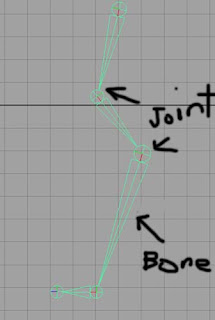
When you move or rotate or scale the joint, its child, and subsequent children will be affect by it.
The Joints have their own local axis. It is determined by the position of its child. If it does not have a child, the local axis will align with world space. If a joint has a child, by default its X axis points towards the child.
*Important* The bones between 2 joints are just visual connections. They do not really exist in the scene. You cannot add weights or parent objects to bones. Only to joints.
Creating Joints are literally creating a parent and child Hierarchy. The more joints you create, the more parent-child relationship there is in the hierarchy.
When you move or rotate or scale the joint, its child, and subsequent children will be affect by it.
The Joints have their own local axis. It is determined by the position of its child. If it does not have a child, the local axis will align with world space. If a joint has a child, by default its X axis points towards the child.
*Important* The bones between 2 joints are just visual connections. They do not really exist in the scene. You cannot add weights or parent objects to bones. Only to joints.
The size of the joints and bones can be changed in the tool settings of the Joint Tool. Adjusting the size will not affect how the joints work. This is not to be confused with actual scaling of the Hierarchy.
You can also use Display -> Animation -> Joint Size to change the size of the joints.
*Note* Scaling or rotating the hierarchy WILL affect how the joints work. If a joint is rotated or scaled, you MUST freeze transformations on the joints to reset the values. For joints, Translate values will not freeze. There will always be a value so that Maya knows where that joint in world space in relation to its parent joint. So do not freak out.
Joint Should be placed in the Orthographic Views as it can only be place on a grid.
maya rigging joints simplified.
In order to animate a modelled character in maya, there are 3 process to do before we can start animating.
1.) Create BlendShapes. (Different facial expressions as well as any different geometry deformation during animation).
2.) Create a Skeletal Rig. ( The bones and controls to animate the character)
3.) Bind the Rig and BlendShapes to the model. (aka Skinning, assigning vertices of your geometry to the skeleton)
A skeletal Rig in Maya is predominationly built using joints. (Animation -> Skeleton -> Joint Tool)
Each appendage is its its own joint hierarchy. And they will be controled seperately. So separate chains have to created for Hands, Arms, Legs, Foot, Spine etc... These are then parented together into one big hierarchy.
The skeletal Rig should be believable and and functional. As in reality, the position of the joint is important to have the character move in a believable manner.
We will need to understand how Joints and Local Space work in order to better understand the rigging process.
Each appendage is its its own joint hierarchy. And they will be controled seperately. So separate chains have to created for Hands, Arms, Legs, Foot, Spine etc... These are then parented together into one big hierarchy.
The skeletal Rig should be believable and and functional. As in reality, the position of the joint is important to have the character move in a believable manner.
We will need to understand how Joints and Local Space work in order to better understand the rigging process.
February 23, 2009
Blend shape notes.
Before anything, freeze the base geo and delete history. make sure its at world space.
blend shapes things to note.
1.) Do not smooth the object before doing the blend shape
2.) Make sure to rename the blend shape geo before applying the blend shape deformer.
3.) Do not delete history on the geometry after the blend shape deformer is applied. But u can do it before.
4.) Do not rotate or scale the blend shapes geo on a object level and never freeze transformation.
5.) Do not delete faces or vertices from the blendshapes.
6.) Do not freeze transformations on blend shapes. You can freeze before the blendshapes are created, however once the target shapes are created, do not freeze transformations on the base or target shapes. If not the base will fly back to the origin when animating.
7.) When defining a blend shape, the base shape must be selected LAST.
blend shapes things to note.
1.) Do not smooth the object before doing the blend shape
2.) Make sure to rename the blend shape geo before applying the blend shape deformer.
3.) Do not delete history on the geometry after the blend shape deformer is applied. But u can do it before.
4.) Do not rotate or scale the blend shapes geo on a object level and never freeze transformation.
5.) Do not delete faces or vertices from the blendshapes.
6.) Do not freeze transformations on blend shapes. You can freeze before the blendshapes are created, however once the target shapes are created, do not freeze transformations on the base or target shapes. If not the base will fly back to the origin when animating.
7.) When defining a blend shape, the base shape must be selected LAST.
February 18, 2009
animation notes for oneself.
1.) key frame the key poses 1st. then the 2nd motions.
2.) try to keep the keyframes for the key movements of different relating joints on the same key frame. (Note down the key frame numbers).
3.) Only after the key poses are established, then work on the 2nd motion.
4.) little pauses in the animation. inbetween keyframes is good.
5.) What the character is thinking at each key pose.
6.) remember, there is follow through in animation. it is not one pose to the next, to the next.
2.) try to keep the keyframes for the key movements of different relating joints on the same key frame. (Note down the key frame numbers).
3.) Only after the key poses are established, then work on the 2nd motion.
4.) little pauses in the animation. inbetween keyframes is good.
5.) What the character is thinking at each key pose.
6.) remember, there is follow through in animation. it is not one pose to the next, to the next.
Subscribe to:
Posts (Atom)